
Ferric
Native Rust music player with Spotify library sync for Windows
Ferric is a native Windows desktop music player built in Rust with DirectX 11 hardware UI, a pure-Rust dual-deck audio engine, and local SQLite storage. Sign in with your Spotify account (Free & Premium) to sync your playlists and library alongside local FLAC/MP3/Opus folders, YouTube Music discovery, and synchronized lyrics without Electron.
Windows 10/11 x64 · Free · MIT
Ferric is a desktop audio player and library controller. No copyrighted music files are bundled; local folders and optional YouTube Music, Spotify, or OpenSubsonic accounts belong to the user.
Official builds are unsigned. Follow your device security policy and verify SHA-256 checksums before installing; do not disable antivirus or Windows protection. Release verification.
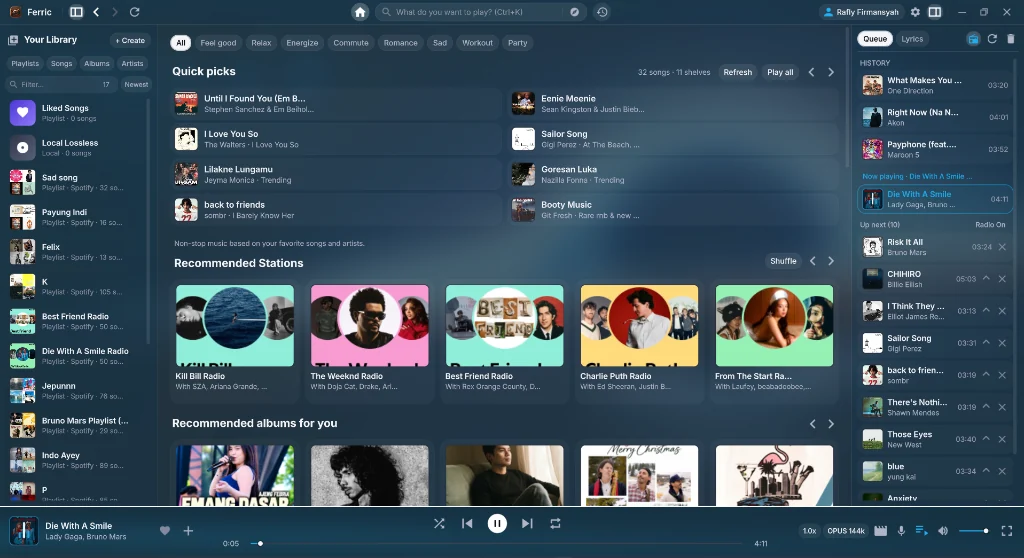
Spotify library sync, audiophile playback, and Windows 11 Acrylic
- Sign in directly with Spotify (Free or Premium, no API key or Developer Client ID required) under Settings > Accounts to sync your Liked Songs, personal and followed playlists, and personalized Recommended Stations into Ferric.
- Scan local lossless/lossy folders (FLAC, MP3, AAC/M4A, ALAC, Ogg Vorbis, Opus, WAV, AIFF), browse YouTube Music Home/Search/Smart Radio, connect OpenSubsonic/Navidrome, or import public playlist URLs and .m3u/.csv files.
- Pure-Rust dual-deck engine with gapless album playback, 0-12 s auto-crossfade (140 Hz Bass-Swap Automix, S-Curve Velvet, Equal-Power), 10-band parametric Biquad EQ, 24 built-in AutoEq profiles, Equalizer APO import/export, ReplayGain, Sleep Timer, and one-click bottom-bar Playback Speed (0.75x to 1.5x).
- 4-stage synchronized lyrics waterfall (local .lrc sidecar, embedded tags, LRCLIB, Lyrics.ovh) with timing offset buttons (-0.5s / +0.5s), Fullscreen Synced Lyrics aurora stage with live signal path telemetry, and optional docked HD music video clips.
- Four themes (AMOLED Black default, Native Acrylic, Obsidian Studio, Warm Cream Light) with GPU HSV tint picker, Adaptive Artwork Accent, and Adaptive Acrylic Tint calibrated for WCAG AA contrast.
- Full Windows SMTC integration (album cover art, live timeline position, and seekbar support for Quick Settings, Nusa Pro, NotchPixel, and ModernFlyouts), taskbar thumbnail media buttons, and device-theme-aware dark/light system tray controls.
- Integrated-GPU-first DX11 policy keeps discrete laptop GPUs asleep, while Windows DPAPI encrypts saved Spotify and account credentials at rest and full MSI uninstall cleans all Ferric user data cleanly.
Ferric is built in Rust with makepad-widgets (DX11 + DirectComposition), Symphonia, pure-Rust Opus, Rubato, and SQLite. Optional Discord Rich Presence and Ferric Connect LAN pairing stay inactive unless you turn them on.
How to install and sync your Spotify or local library
- Download the per-user Windows x64 MSI installer (ferricsetup-v0.1.1.msi) or portable ZIP (Ferric-v0.1.1-windows-x86_64.zip) from the official GitHub Release and verify its SHA-256 digest against SHA256SUMS.txt.
- Run Setup for your user account without administrator privileges, or extract the portable ZIP into a permanent folder.
- Open Settings > Accounts and sign in through the unified Spotify Account (Free & Premium) card to sync your Spotify playlists and library, or connect YouTube Music / OpenSubsonic. Add local music folders under Settings > Storage.
- Open Settings > Appearance to switch between AMOLED Black, Native Acrylic, Obsidian Studio, and Warm Cream Light, or adjust UI zoom (Ctrl - / Ctrl + / Ctrl 0).
- Use Space to play/pause, Shift+Left/Right to skip tracks, L for Lyrics, F for Fullscreen Lyrics, and Ctrl+K for the Command Palette.
Requirements and observed resource use
| Item | Details |
|---|---|
| Operating system | Windows 10 or Windows 11 on a 64-bit (x86_64) PC. No administrator rights needed. |
| Native Acrylic | Hardware DirectComposition Acrylic works best on Windows 11; solid themes work on both Windows 10 and Windows 11. |
| GPU policy | Prefers the integrated GPU on hybrid systems so discrete NVIDIA/AMD GPUs stay asleep (0 dGPU DLLs loaded in idle test). |
| UI open, idle (v0.1.1) | 6.0 MB memory, 0.0% CPU, 0.0% GPU (iGPU only, 0 dGPU DLLs loaded, measured 10 s after launch). |
| Active streaming playback, UI open (v0.1.1) | 49.0 MB memory, 0.3% CPU, 0 MB/s disk, 0 Mbps steady after buffer (35.5 - 49.5 MB across track switches). |
| Fullscreen Synced Lyrics active (v0.1.1) | 51.6 MB memory, 2.8% CPU, 0 MB/s disk with live ambient aurora shader and real-time visualizer on iGPU. |
| Minimized to tray, playing (v0.1.1) | 13.3 MB memory, 0.5% CPU, 0.0% GPU with automatic working-set trimming (6.5 - 17.1 MB across track switches). |
Observed on the author's Windows 11 laptop (x86_64, Intel iGPU + hybrid dGPU), not fixed ceilings or guarantees. Actual memory, CPU, and GPU depend on library size, display DPI, graphics driver, streaming codec, and Fullscreen Lyrics or video clip usage.
Questions before installing Ferric
Yes. Open Settings > Accounts and sign in with your Spotify account (both Free and Premium are supported in one unified sign-in card) to sync your playlists and library into Ferric. Credentials are encrypted locally with Windows DPAPI, and signing in remains optional if you only want local lossless files or public YouTube Music discovery.
Upgrading preserves your SQLite library database, equalizer presets, and themes under %LOCALAPPDATA%\LivelyDesk\Ferric. Performing a full uninstall via Windows Apps removes Ferric binaries, caches, logs, and user data cleanly without touching sibling LivelyDesk apps.
No. Ferric is compiled natively in Rust with a DirectX 11 UI and an integrated-GPU-first adapter policy (0 dGPU DLLs loaded in idle testing), with zero Chromium or Electron runtime overhead.
Release verification & unsigned builds
Published releases are currently unsigned (no Authenticode code-signing certificate is active). All official releases are built transparently from public source via GitHub Actions.
- SHA-256 checksums: Compare your local file digest against SHA256SUMS.txt on each GitHub Release before running Setup.
- Maintainer: Rafly Firmansyah (@Raflyf)
- Windows protections: Keep antivirus and Windows Defender protections enabled, and do not run Setup as Administrator.
Privacy policy
Ferric does not collect or transmit telemetry, analytics, or local library paths to developer servers. Your SQLite database, caches, and settings stay locally under %LOCALAPPDATA%\LivelyDesk\Ferric with saved account credentials encrypted using Windows DPAPI. On startup, Ferric checks api.github.com for releases (opt-out in Settings > About) and loads Home shelves from music.youtube.com plus artwork CDNs (and Spotify Pathfinder when signed in to Spotify). On-demand playback uses www.youtube.com / *.googlevideo.com, lyrics query lrclib.net / api.lyrics.ovh when no local lyrics exist, while Google/Spotify/Subsonic sign-in, local Discord IPC, and Connect LAN UDP 43821 operate strictly on user action.